How to set up a VPN on a router
A VPN on your router protects every device on your home network, including smart TVs and game consoles that cannot run VPN apps.
Before you start
- A router whose firmware includes a VPN client feature (check the manual; many models only include a VPN server)
- Your router's admin password
- A WireGuard or OpenVPN configuration file from your provider
- A wired connection to the router while you make changes
Not sure which provider to use yet? Start with how to choose a trustworthy VPN.
- Router admin page
- Advanced
- VPN
- VPN Client
Admin page address: it is printed on the router label, often 192.168.0.1 or 192.168.1.1. Type it into your browser while connected to the router.
Set up a VPN on a router with a provider configuration
The provider's app is the easiest option and usually includes a kill switch, DNS leak protection and modern protocols such as WireGuard.
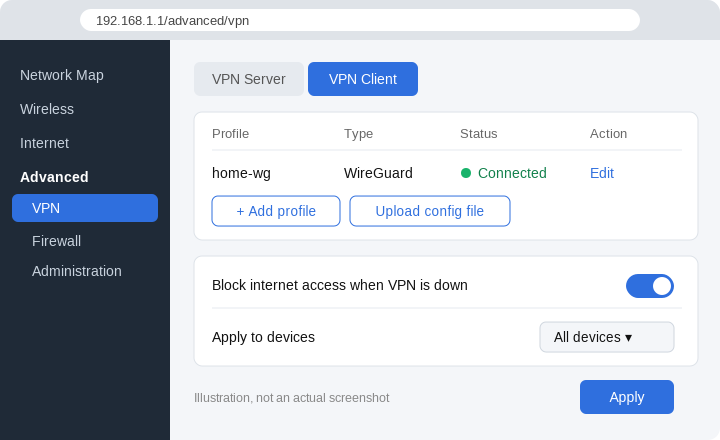
Confirm VPN client support
In the admin page or manual, look for VPN Client with WireGuard or OpenVPN support. A “VPN Server” feature is something different.
Update the firmware
Apply the latest router firmware before adding a VPN.
Generate a router configuration
In your VPN provider's account area, create a WireGuard or OpenVPN configuration for router or manual use and save the file.
Add the profile
Open VPN → VPN Client in the admin page, add a new profile, upload the file and enter any user name or password required.
Enable and apply
Turn the profile on and apply. Some routers let you choose which devices use the VPN; select all devices or the ones you want to protect.
Router VPN without built-in client support
If your router has no VPN client feature, you have two options.
Use a VPN-capable travel or secondary router
Connect a second router that supports VPN client mode behind your main router and join your devices to it.
Use VPN apps on each device
Set up the provider's app on each phone and computer with our step-by-step setup guide.
How to check the router VPN is working
Check the router status
The VPN Client page should show Connected with a tunnel IP address.
Test from a device
On any device connected to the router (with its own VPN app turned off), check that the IP address now belongs to the VPN server.
Run a DNS leak test
Only your VPN provider's DNS servers should appear. If your ISP shows up, set the router's DNS to the servers your VPN provider recommends.
For a complete set of leak tests, see how to check if your VPN is working.
Recommended router VPN settings
| Setting | Where to find it | Why it matters |
|---|---|---|
| Kill switch / block when VPN down | VPN Client profile options | Stops devices from using the internet without the VPN. |
| DNS from VPN | VPN Client profile or WAN DNS settings | Prevents DNS leaks to your ISP. |
| Per-device routing | VPN Client → device or policy list | Lets devices like a work laptop bypass the home VPN. |
| Strong admin password | Administration settings | Protects the device that now carries all of your traffic. |
Fixing common router VPN problems
| Problem | What to try |
|---|---|
| Internet is much slower | Router processors limit encryption speed. Use WireGuard if supported, or keep the VPN on devices instead. |
| Some services block the connection | Route those devices outside the VPN with per-device routing. |
| The tunnel does not connect | Regenerate the configuration file, check the router's date and time, and make sure the firmware is current. |
Router VPN questions
Is a router VPN better than a VPN app?
It covers every device, including those that cannot run apps, but you cannot easily switch servers per device and speed depends on the router's processor.
Should I use a VPN app on top of a router VPN?
Usually not. Running both adds a second tunnel and slows the connection. Turn the app off on devices behind the router VPN.
Which protocol is best for routers?
WireGuard, if your router supports it. It is much lighter than OpenVPN, which matters on router hardware.
Sources and official documentation
If your screen differs from our description, the official documentation takes precedence.
- WireGuard quick start WireGuard
- OpenVPN 2.6 manual OpenVPN
Ready to protect your connection?
Follow our step-by-step guide to choose a trustworthy provider, set up your device and confirm that your VPN is working.
GET VPN